Approve invoices
Purchase invoice → Approval is for users who belong to an approval flow. Here you approve or reject posted purchase invoices that your colleagues have processed.
A rejected invoice is returned with a comment and moved back to Received invoices for further processing.
Finding an invoice
The search bar accepts vendor name, invoice number and document number. The X clears it.
The same filters as elsewhere in the module are available — document date, received date, due date, awaiting approval by, department and employee. Choose values and click Select to apply them.
The two views
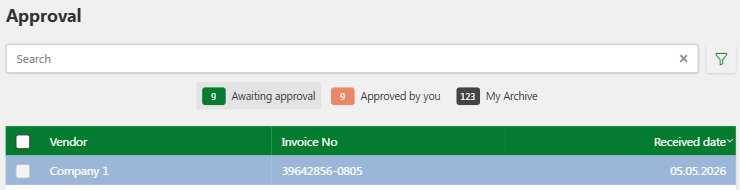
| View | What it shows |
|---|---|
| Awaiting approval | Posted invoices waiting for you, because you are in the assigned flow. |
| Approved by you | Invoices you have already approved. |
Awaiting approval is active when the page opens, so what needs action comes first. The active view has a darker background.
Approval flows with several approvers
Where a flow needs more than one approver, approving moves the invoice from Awaiting approval to Approved by you — it is out of your hands but not yet finished.
Once every approver in the flow has approved, the invoice is archived in Archive. Everything you have approved also stays visible under My archive.
At that point a payment is created in the bank module, unless the payment type was set to Paid during posting, which means the invoice was already settled.
How to approve
- Select the invoice in the list.
- Review the document, the amount, the account and the dimensions.
- Choose Approve or Reject.
Rejecting asks you to confirm, and a comment may be required depending on the setup.
Several invoices at once
Tick several invoices and approve or reject them together with one shared comment — either optional or required, depending on the setup.
While invoices are ticked, finish or clear the selection before working on a single invoice again.
When you cannot approve
If the button is disabled, the reason is shown on it:
| Message | What it means |
|---|---|
| Select an invoice first | Nothing is selected. |
| It is not your turn to approve this invoice | The invoice sits with someone else in the approval order. |
| This invoice is not waiting for a decision | It has already been dealt with. |
| You cannot approve this invoice in its current state | The status does not allow it. |
| You do not have permission to approve this invoice | Your user lacks the right. |
| Only accounting can process this invoice | The invoice has not been sent for approval yet. |
| Save or cancel edits before approving | You have an invoice or a line open for editing. |
Which flow an invoice follows
The flow is chosen when the invoice is posted, in a fixed order: a cross-company rule if one matches, otherwise a flow set up for the vendor, otherwise the company's default flow. Flows are selected by the invoice's amount, so the same vendor can route a small invoice to one approver and a large one to another.
Flows are set up under Purchase invoice → Approval rules and in the settings module.
The buttons
| Button | What it does |
|---|---|
 |
Download — saves the invoice to your device. |
 |
Table navigation — moves between pages. |
 |
Rows per page. |
 |
Approve — approves the invoice. |
 |
Reject — returns it with a comment. |
 |
Expand — opens the full detail. |